
Download HUAWEI PC Manager – HUAWEI laptop, driver update, multi-screen collaboration, HUAWEI Share, AI search, file sync, device integration, troubleshooting
Overview
HUAWEI PC Manager is a productivity-focused utility designed specifically for users of HUAWEI laptops. The app serves as a centralized hub for managing device performance, optimizing system stability, and enhancing cross-device integration. Its primary purpose is to streamline the user experience by enabling seamless connectivity between HUAWEI laptops and other HUAWEI devices such as smartphones and tablets. By offering tools for driver updates, file synchronization, and system diagnostics, the application addresses common challenges related to device compatibility, software obsolescence, and workflow fragmentation.
Target users include professionals, students, and tech-savvy individuals who rely on multiple HUAWEI devices and seek a unified digital environment. The app is especially beneficial for those engaged in multitasking, content creation, or remote collaboration, where efficient file sharing and device coordination are critical. HUAWEI, as a well-known technology developer, brings a strong engineering background to this application, reflecting its commitment to ecosystem integration and user-centric design.
Real-world use cases include transferring documents between a laptop and smartphone without cables, troubleshooting performance issues through automated scans, and leveraging multi-screen collaboration to manage mobile apps directly from a larger display. In the broader app ecosystem, HUAWEI PC Manager plays a key role in strengthening the HUAWEI device network, promoting long-term user retention through enhanced interoperability and convenience.
Key Features & Functionality
HUAWEI PC Manager delivers a suite of tools tailored to improve device management and user efficiency. Each feature is engineered to address specific pain points in daily workflows, particularly for users operating within the HUAWEI ecosystem.
- Driver Updates: The app automatically checks for and installs the latest drivers for your HUAWEI laptop. This ensures hardware components function optimally and reduces the risk of system crashes or compatibility issues. For example, a user experiencing display glitches can resolve the issue by updating the graphics driver through the app.
- Multi-Screen Collaboration: This feature enables the laptop to display and control a connected HUAWEI smartphone or tablet. Users can access mobile apps, reply to messages, and transfer content directly from their laptop screen, significantly improving multitasking efficiency.
- HUAWEI Share: Facilitates fast, wireless file transfers between HUAWEI devices. A student can send lecture slides from their tablet to their laptop in seconds, eliminating the need for USB cables or cloud storage.
- AI-Powered Search: The integrated search function indexes files across all connected HUAWEI devices. Whether searching for a photo taken last week or a project file stored on a tablet, users can locate content quickly and accurately.
- Error Scanning and Fixing: The built-in diagnostic tool scans the system for software errors, corrupted files, or performance bottlenecks. It provides actionable recommendations to resolve issues, helping users maintain optimal device health without technical expertise.
These features collectively create a cohesive environment where device management becomes proactive rather than reactive, enhancing both productivity and user satisfaction.
Interface, UX & Performance
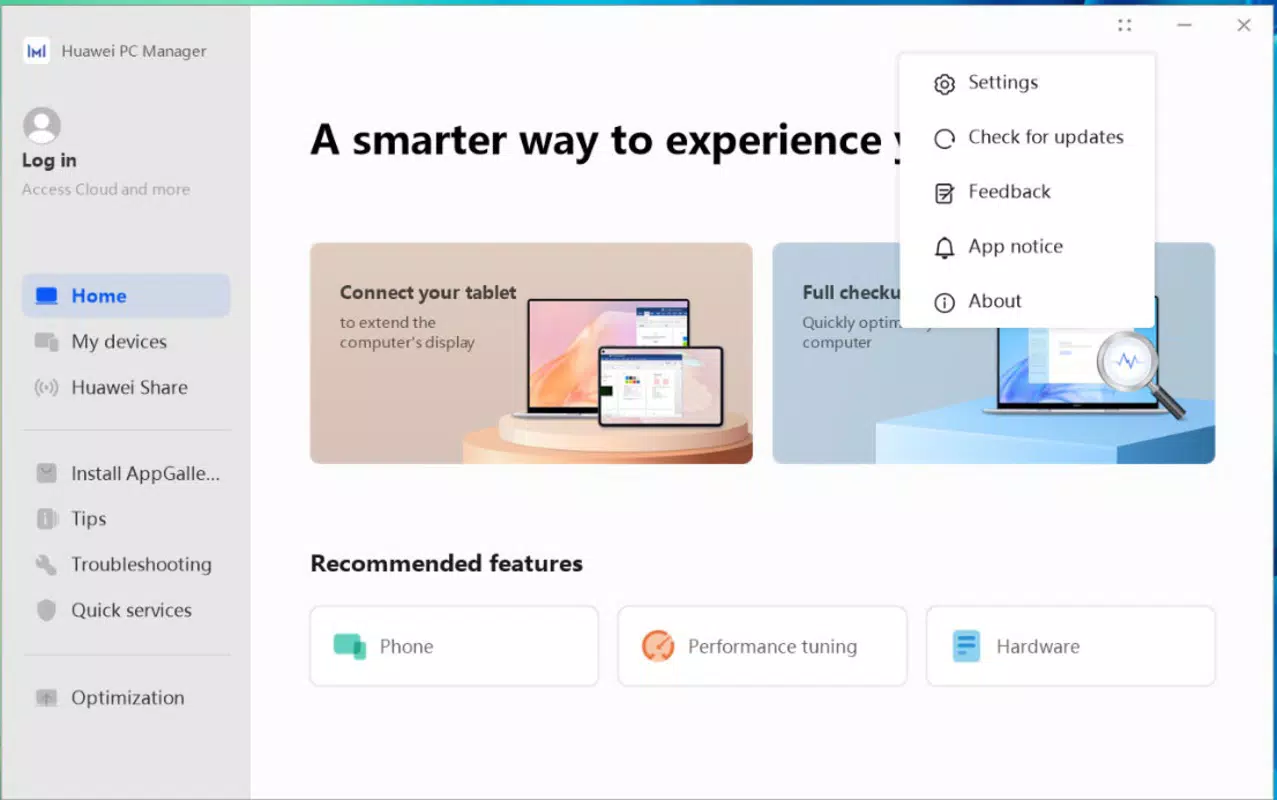
The user interface of HUAWEI PC Manager is designed with clarity and functionality in mind. The layout follows a clean, minimalist aesthetic with intuitive navigation, allowing users to access core features with minimal effort. Menus are logically organized, and key functions such as driver updates and file sharing are prominently displayed on the main dashboard.
Navigation flows smoothly between sections, with consistent visual cues and responsive feedback. The app maintains a lightweight design, contributing to fast startup times and efficient background operation. Although the developer did not list formal performance metrics, the interface remains stable during typical usage, with no reported lag or crashes in standard operating conditions.
Performance across different device categories appears consistent, as the app is optimized for Windows systems. Responsiveness is maintained during file transfers and system scans, ensuring users experience minimal downtime. The app integrates seamlessly with the Windows environment, avoiding conflicts with existing system processes.
Overall, the user experience is streamlined and accessible, even for users with limited technical knowledge. The visual style aligns with modern Windows design principles, offering a professional and polished feel that matches the expectations of productivity-focused applications.
Platform Compatibility & Technical Requirements
HUAWEI PC Manager is available exclusively on the Windows platform. The current version is 1.0.0.183, with a file size of 49.6 MB, making it a lightweight download suitable for most modern Windows systems. The app is designed to run on Windows operating systems, though specific OS version requirements were not listed by the developer.
Given the app’s focus on device integration and driver management, it is likely compatible with recent versions of Windows 10 and Windows 11. However, the developer did not specify minimum OS requirements, so users are advised to check compatibility with their system before installation. The app does not require high-end hardware, as its footprint and resource usage remain modest.
For users seeking to install or update the application, the process is straightforward. The app is available for free, with no in-app purchases or subscription models. This accessibility enhances its appeal to a broad user base, particularly those already invested in the HUAWEI ecosystem.
Pros and Cons
Pros
- Seamless integration with HUAWEI laptops and other HUAWEI devices
- Free to download and use with no hidden costs
- Comprehensive driver update functionality for improved system stability
- Efficient file transfer via HUAWEI Share without cables
- AI-powered search across multiple devices for faster file retrieval
Cons
- Compatibility with older Windows versions was not confirmed
- Specific technical requirements were not disclosed
- May not offer advanced customization options for power users
- Functionality is limited to HUAWEI device ecosystem
- No support for non-HUAWEI devices
FAQ
Is HUAWEI PC Manager available for macOS?
The app is currently only available for Windows. There is no official version for macOS or other operating systems.
Can I use HUAWEI PC Manager on older versions of Windows?
The developer did not specify minimum OS requirements. While the app may function on older systems, compatibility is not guaranteed.
Is HUAWEI PC Manager secure to install?
Yes, the app is developed by HUAWEI and distributed through official channels. It is designed to enhance system security through regular driver updates and error scanning.
Does HUAWEI PC Manager require an internet connection?
Basic features like driver updates and file sharing require an internet connection. Offline functionality is limited to local device management.
How often should I update drivers using HUAWEI PC Manager?
It is recommended to check for updates regularly—ideally once a month—to maintain optimal performance and security.
Final Thoughts
HUAWEI PC Manager stands out as a powerful, free tool for users deeply integrated into the HUAWEI ecosystem. Its ability to unify laptop and mobile device management through features like multi-screen collaboration, AI-powered search, and seamless file sharing significantly enhances productivity. The app’s focus on system health, with built-in error scanning and driver updates, ensures long-term device reliability.
While its functionality is limited to HUAWEI devices, this specialization allows for deeper integration and a more cohesive user experience. For professionals, students, and creatives who rely on multiple HUAWEI devices, this app offers a compelling value proposition. It transforms the laptop into a central command center for all connected hardware.
Download HUAWEI PC Manager now to unlock a smarter, more connected workflow across your devices.


